- By the end of this course, you will be able to create a PLC program from scratch.
- Students will learn the difference between digital and analog signals and how to bring them into a PLC, process them, and send them back out.
- Students will explore basic, standard controls techniques for things like HOA control, level control, pump control, and (on at least an introductory level) PID control loops.
- Students will be introduced to HMI development and given a general understanding of how an HMI program works.
- The primary and overall objective of this course is to give a novice an understanding of PLC programming, ladder logic, and the inner workings of a standard HMI (Human-Machine Interface).
- Students will be familiarized enough with a sufficient variety of ladder logic instructions to create a complete PLC program from scratch.
- Students will develop an understanding of alarm and notification programming, and the relevant considerations to safety and operator usability.
- What is Automation? 00:00:18
- Need of Automation in Industry 00:00:18
- Relay Logic vs PLC 00:00:18
- Advantages of PLC 00:00:18
- PLC Applications (Manufacturing, Power Plants, Robotics, Smart Factories) 00:00:18
- Practical Task 00:00:00
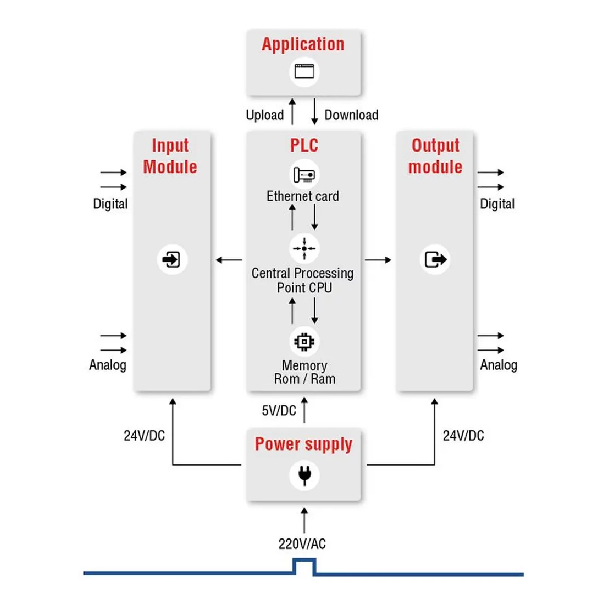
- PLC Block Diagram 00:00:18
- CPU, Power Supply 00:00:18
- Input Modules (Digital / Analog) 00:00:18
- Output Modules (Relay / Transistor / Triac) 00:00:18
- PLC Scan Cycle 00:00:18
- PLC Wiring Standards 00:00:18
- Ladder Logic (LD) 00:00:18
- Function Block Diagram (FBD) 00:00:18
- Structured Text (ST) – Introduction 00:00:18
- Instruction List (IL) – Overview 00:00:18
- Sequential Function Chart (SFC) 00:00:18
- Create first PLC program 00:00:18
- Start/Stop motor using Ladder Logic 00:00:18
- Program download & online monitoring 00:00:18
- NO & NC Contacts 00:00:18
- Coils 00:00:18
- Set / Reset 00:00:18
- Latching Circuits 00:00:18
- Internal Relays / Flags 00:00:18
- Rask 1 How to Motor ON/OFF with push buttons 00:00:18
- Latching circuit 00:00:18
- Emergency stop circuit 00:00:18
- On Delay Timer (TON) 00:00:18
- Off Delay Timer (TOF) 00:00:18
- Retentive Timer (RTO) 00:00:18
- Up Counter / Down Counter 00:00:18
- Traffic light using timers 00:00:18
- Conveyor object counting 00:00:18
- Automatic parking system 00:00:18
- Equal, Greater, Less Than 00:00:18
- Analog comparison 00:00:18
- Arithmetic operations (+, –, ×, ÷) 00:00:18
- Temperature-based fan control 00:00:18
- Tank level monitoring 00:00:18
- Speed control logic 00:00:18
- Analog Signals (0–10V, 4–20mA) 00:00:18
- Sensors (Temperature, Pressure, Level) 00:00:18
- Scaling Analog Values 00:00:18
- Task 1 Temperature control system 00:00:18
- Water level control using analog sensor 00:00:18
- PLC analog monitoring 00:00:18
- PLC Communication Basics 00:00:18
- Modbus RTU / TCP 00:00:18
- HMI Overview 00:00:18
- SCADA Introduction 00:00:18
- Task 1 .PLC to HMI communication 00:00:18
- Data display on HMI 00:00:18
- Task 3 .Start/Stop motor from HMI 00:00:18
- Electrical Safety Standards 00:00:18
- Interlocking 00:00:18
- Fault diagnosis 00:00:18
- PLC Debugging 00:00:18
- Error Handling 00:00:18
- Task 1 Fault simulation & troubleshooting 00:00:18
- Task 2 Interlock safety circuit 00:00:18
- Emergency stop testing 00:00:18
- Project 1. Automatic Bottle Filling System 00:00:18
- Project 2 :- Conveyor Belt with Sorting System 00:00:18
- Project 3:- Traffic Light Control System 00:00:18
- project 4:- Automatic Water Tank Level Control 00:00:18
- Project 5:- Elevator Control System 00:00:18
- Project 6 :- Smart Parking System 00:00:18
- Project 7 :- Industrial Motor Protection System 00:00:18
- There is no software, hardware or experience required in order to complete this course, but practicing the techniques discussed on an emulator or live PLC are necessary steps toward eventual mastery.
- requirement Laptop and Wifi
This course (which almost ALWAYS costs less on PLC Dojo) is designed to equip the novice with no prior PLC programming experience with the basic tools necessary to create a complete PLC program using ladder logic common to most current platforms.
Using the Rockwell software RSLogix 500 and FactoryTalk View Studio, we will be covering such topics as general controls, digital and analog IO, ladder logic programming, alarm / notification handling, HMI, emulation, best practices and more.
In the end, we will go through an entire, working PLC program and HMI line by line to solidify comprehension of the learning objectives.
What's covered in each of the five PLC courses I teach here and on my own PLC Dojo site?
This course, (PLC Fundamentals) teaches you how to program with the focus on ladder logic, which is the most popular PLC programming language. The goal is to teach you everything you need to know to make a PLC do what you want it to do. You are also given all the software necessary to both CREATE and RUN your own programs live - right on your own computer. For some people, that's all they really need.
But for the people who want to really master PLC programming, they have the option of continuing into the advanced material with me.
Applied Logic (Level 2) forces you to take what you've learned and solve problem after progressively harder problem unassisted. You get a spec and are told simply: "Make it work, and don't progress until you have." After, you get to watch me solve each one as well. By the end, you don't just know how to program - you are a PROGRAMMER.
Process Visualization (Level 3) gives you both knowledge and experience in FIVE different HMI / SCADA development environments. By the end, you've created several COMPLETE visualization (screen) projects that you can actually run on your own computer (and SHOW PEOPLE in an interview) with no additional hardware.
IEC Paradigms (Level 4) is only for the heavyweights. This course teaches you how to program using all five IEC programming languages (plus one more) in multiple environments. There are projects as well, so by the end, you have seen it all and DONE it all as well. There won't be anything anybody can show you that you won't already be familiar with.
TIA Portal Master Project (Level 5) is the culmination of everything. In that course, you'll program an entire power plant using all five PLC programming languages (in PARALLEL!) with a full HMI. It's a massive and complex project that really showcases your talents in an interview!

- 12 Reviews
- 144 Students
- 5 Courses
Hi , I'm Abhishek Verma
I am an Electronic Engineer and have a B. Tech in Electronic and communication Engineering from AKTU Lucknow University, India. I have a passion to learn and teach electronics and other related courses. I produce videos on YouTube about how electronic circuits work and review several electronic stuff. I am now an PCB Designer Engineer in Company and I hope you enjoy my courses here.
Write a public review